Design Doc: Felix 2.0 - Add Priority to Tasks #
2025-03-24
Issue/References:
- GitHub Issue: Felix 2.0 - Task Priority
- Related Docs/Designs:
Introduction #
- Purpose: The goal is to introduce a priority system for tasks in Felix 2.0. This enhancement will enable users to categorize tasks based on urgency and relevance.
- Problem Statement: Tasks currently lack structured prioritization, making it difficult to manage urgent issues effectively. While an optional priority system (High, Medium, Low) exists, not all tasks have a defined priority. To improve task management, we will introduce a numeric priority value alongside user-defined priority levels (if any).
The numeric priority value will be calculated using key factors such as: - Account ARR
- Health score
- Sentiment analysis
- Account expiry date
- Task due date
Priority levels will be mapped as follows: - >70 - High
- 50-70 - Medium
- 10-50 - Low
- <10 - Unprioritized
Background #
- Context:
Currently, we have the option to create, update, get and delete the tasks.
api.handle("POST", "/api/tasks", permissionWorkspacesRead, apiTasks.PostTask)
api.handle("PUT", "/api/tasks/{task_id}", permissionWorkspacesRead, apiTasks.PutTask)
api.handle("GET", "/api/tasks/{task_id}", permissionWorkspacesRead, apiTasks.GetTask)
api.handle("DELETE", "/api/tasks/{task_id}", permissionWorkspacesRead, apiTasks.DeleteTask)
api.handle("GET", "/api/tasks", permissionWorkspacesRead, apiTasks.GetTasks)
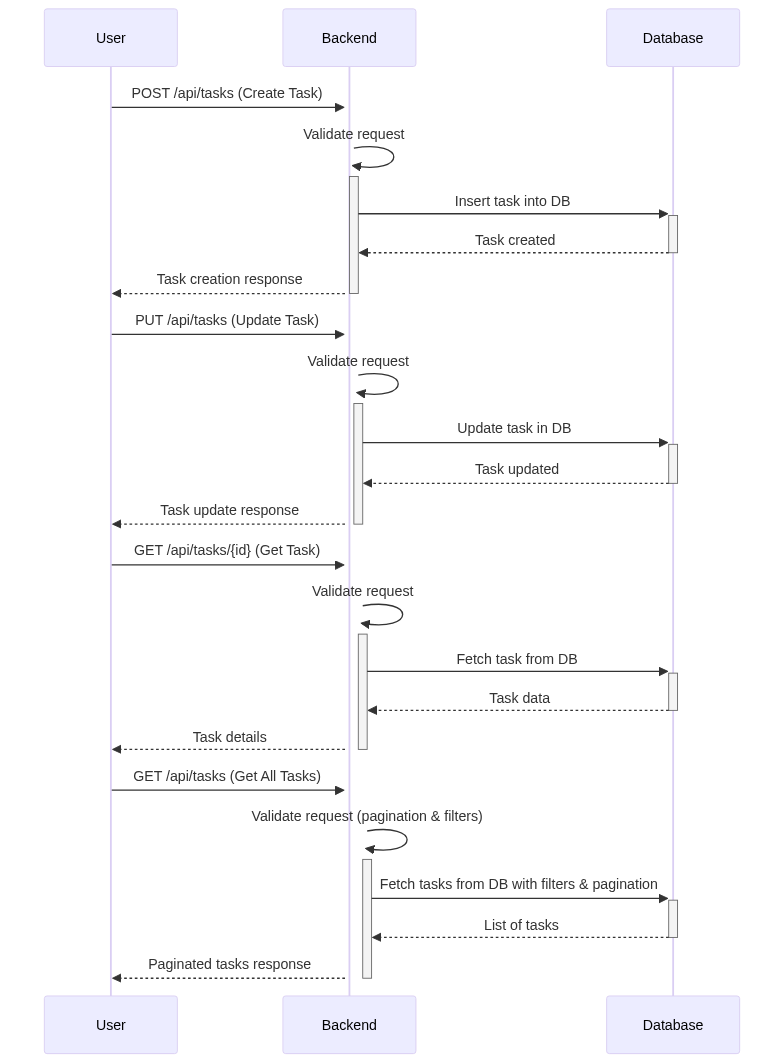
The response of a Task is an object with the following fields:
{
  "ok": true,
  "response": {
    "id": "0195c70f-7876-7030-a8bc-652c67ad801e",
    "title": "My first task",
    "body": "A brief description",
    "state": "open",
    "status": "todo",
    "priority": "medium",
    "associations": [
      {
        "entity_id": "38b262d0-5ece-9664-85fb-bdea93260a1b",
        "entity_type": "account",
        "properties": {
          "fs_id": "01956fef-b246-75ca-b974-162d96cf0d3f",
          "name": "Adobe"
        }
      }
    ],
    "created_by": {
      "id": "01956fee-9966-758b-84d5-de5e80debe10",
      "type": "user",
      "properties": {
        "designation": "",
        "email": "mamta@funnelstory.ai",
        "name": "Mamta Harris",
        "role": "super_admin"
      }
    },
    "updated_by": {
      "id": "01956fee-9966-758b-84d5-de5e80debe10",
      "type": "user",
      "properties": {
        "designation": "",
        "email": "mamta@funnelstory.ai",
        "name": "Mamta Harris",
        "role": "super_admin"
      }
    },
    "created_at": "2025-03-24T07:30:34.742794Z",
    "updated_at": "2025-03-24T07:48:08.464418Z"
  }
}
The priority mentioned here can be one of High, Medium, Low or Unassigned.
The current constraint that we have is that since there is no mandatory priority present, we do not have a proper way to showcase the tasks ordered by priority high to low in the front end.
- Requirements & Constraints:
- The priority calculation must be dynamic, modular, and support future enhancements without requiring extensive modifications.
- The API should support optional fields, ensuring flexibility when certain data points are unavailable.
- The system should process priority calculations independently for each task, using predefined weighting rules for consistency.
- If multiple accounts are associated with a task, only the first referenced account should be used for ARR, health score, and sentiment analysis
- We need to label the tasks and add metadata to show a churn risk account, task that is due soon, task that will expire soon, sentiment of the account and health of the account.
- The UI should display these tags whenever relevant values are set, improving user experience and visibility.
- The priority must be updated everyday as a background tick.
System Overview #

-
Task Creation:
The user creates a task.
The system calculates the priority score using various factors.
The score is stored in the database along with the task.
The user receives confirmation. -
Task Update:
When the user updates a task, the system recalculates the priority score.
The updated score is saved in the database.
The user receives confirmation. -
Daily Recalculation:
A scheduled job runs daily to recalculate priority scores for all tasks.
The updated scores are saved back to the database.
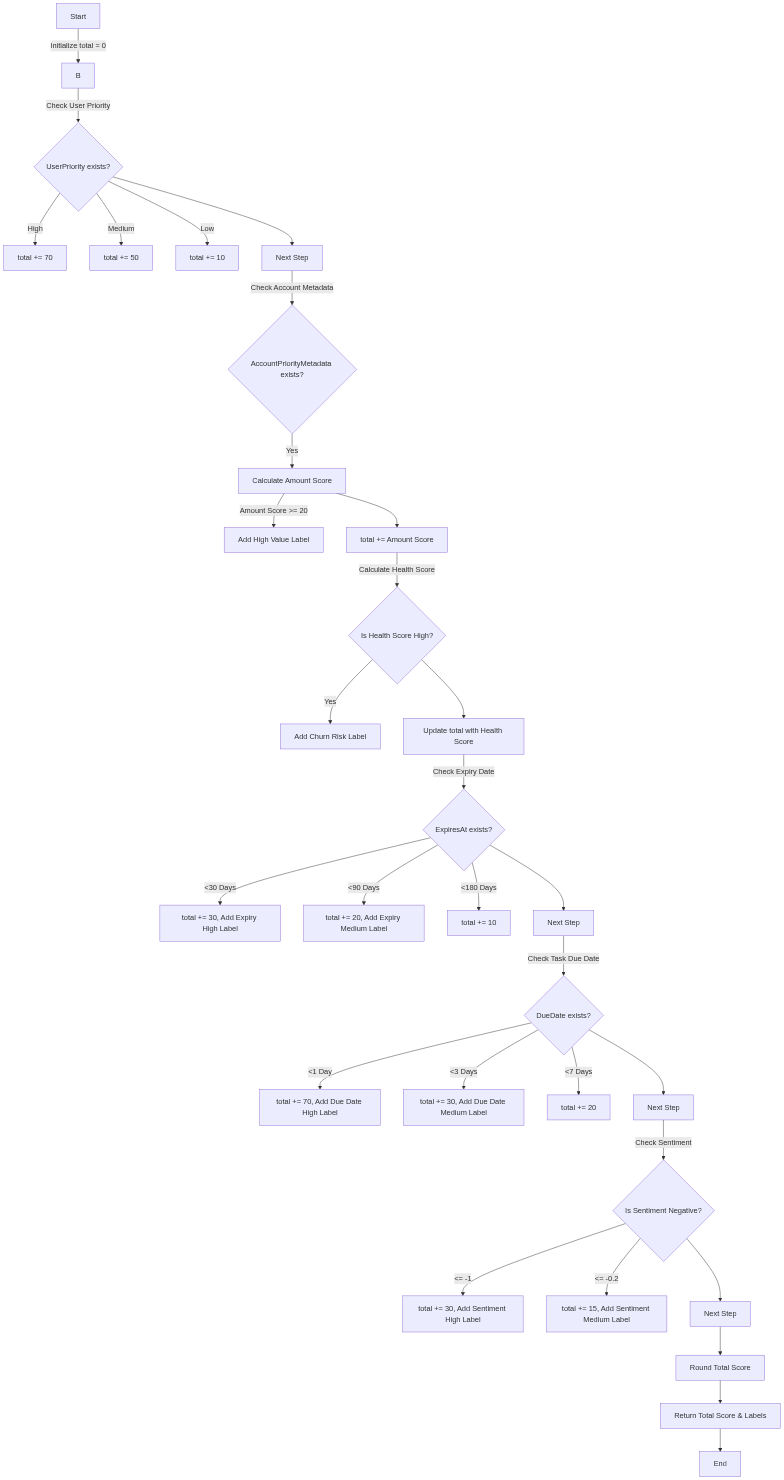
-
Start Calculation
If the user has set a priority (High, Medium, etc.), use it as the initial score.70 if high, 50 if medium and 10 if low.
Otherwise, start with 0. -
Check Optional Fields (One by One) We calculate score without changing the core logic.
Each priority factor (Account ARR, Health Score, Sentiment, Expiry, Due Date, etc.) is wrapped as a decorator that updates the base score only if applicable.Priority Score Documentation
Score Calculation and Priority Mapping #
Introduction #
This document outlines a method to calculate and adjust priority levels based on a score derived from multiple components. It provides a solution for aligning calculated priorities with user-assigned preferences.
Score Components #
The total score is calculated as the sum of the following five components:
- ARR: 0 to 30
- Health: 0 to 33
- Sentiment: 0 to 30
- Expiry Date: 0 to 30
- Due Date: 0 to 70
Calculated Priority #
The total score is mapped to a calculated priority based on the following ranges:
| Score Range | Calculated Priority |
|---|---|
| 70 – 200 | High |
| 50 – 69 | Medium |
| 10 – 49 | Low |
| 0 – 9 | Unassigned (nil) |
Handling User-Assigned Priority #
- If user-assigned priority is missing or matches the calculated priority, the calculated priority is used.
- If the user-assigned priority differs, adjust the calculated score to align with the user-assigned priority.
Score Mapping Formula #
To remap the score while preserving its relative position, use the following formula:
mappedScore = toRangeLower +
((originalScore - fromRangeLower) / (fromRangeUpper - fromRangeLower)) * (toRangeUpper - toRangeLower)
Where:
originalScore: Original score (e.g., 100)fromRangeLower,fromRangeUpper: Limits of the original priority categorytoRangeLower,toRangeUpper: Limits of the user-assigned priority category
Example Scenario #
Calculated Score (x): 100 → High Priority
User-Assigned Priority: Medium
Ranges:
- High: 70 – 200
- Medium: 50 – 69
Apply the formula:
mapped_score = 50 + ((100 - 70) / (200 - 70)) × (69 - 50)
              ≈ 50 + 4.38
              ≈ 54.39
Result: The new adjusted score is approximately 54.39, placing it in the medium priority range.
Recalculating Priority on Update #
When updates occur (e.g., ARR, health changes), recalculate the total score:
Case 1: Same Priority Range #
- Update the relative weight using the mapped score
Case 2: Different Priority Range #
- Update the relative weight using the mapped score
- Update the labels to show the state of the task
Examples #
-
Before update:
- Score = 100 → High
- User-assigned = Medium
- Mapped Score ≈ 54.39
-
After update:
- Score = 130 → still High
- Re-map using the new score:
mapped_score = 50 + ((130 - 70) / (200 - 70)) × (69 - 50)
             ≈ 58.77
Final Priority: Medium
New Mapped Score: ~ 58.77
API Endpoints & Database Schema #
- API Endpoints:
POST /api/tasks- Create a new task.PUT /api/tasks/{task_id}- Update an existing task.GET /api/tasks/{task_id}- Retrieve task details.GET /api/tasks- Retrieve all tasks.
- Modified API response object:
{
    "ok": true,
    "response": {
        "id": "0195d7ca-d18a-76f5-8d08-ca5dd4baa30b",
        "title": "Figure out tasks",
        "body": "All fields set",
        "state": "open",
        "status": "todo",
        "priority": "medium",
        "calculated_priority": "high",
        "priority_score": 76,
        "priority_labels": [],
        "priority_metadata": {
            "user": {
                "priority": "medium"
            },
            "account": {
                "amount": 51043,
                "amount_min": 30243,
                "amount_max": 98243,
                "health_score": 50,
                "sentiment": 2500,
                "expires_at": "2027-06-07T09:50:42Z"
            },
            "task": {
                "due_date": "2025-04-19T00:00:00Z"
            }
        },
        "assignees": [
            {
                "id": "0195c781-dc8b-70ea-b065-108355640687",
                "name": "Mamta Harris",
                "email": "mamta@funnelstory.ai",
                "created_at": "2025-03-24T09:35:31.467928Z",
                "updated_at": "2025-03-24T09:35:31.467928Z",
                "role": "super_admin"
            }
        ],
        "associations": [
            {
                "entity_id": "a414ab94-9b6c-9dd5-d88c-a70475e5bd41",
                "entity_type": "account",
                "properties": {
                    "fs_id": "0195c790-a945-7987-8ceb-001b0c0019ba",
                    "name": "Aeroports de Paris"
                }
            }
        ],
        "due_at": "2025-04-19T00:00:00Z",
        "expires_at": "2025-03-29T00:00:00Z",
        "created_by": {
            "id": "0195c781-dc8b-70ea-b065-108355640687",
            "type": "user",
            "properties": {
                "designation": "",
                "email": "mamta@funnelstory.ai",
                "name": "Mamta Harris",
                "role": "super_admin"
            }
        },
        "updated_by": {
            "id": "0195c781-dc8b-70ea-b065-108355640687",
            "type": "user",
            "properties": {
                "designation": "",
                "email": "mamta@funnelstory.ai",
                "name": "Mamta Harris",
                "role": "super_admin"
            }
        },
        "created_at": "2025-03-27T13:29:08.227756Z",
        "updated_at": "2025-03-27T13:29:08.227756Z"
    }
}
- Database Schema:
- We need to modify the tasks table to add a column to store these priority values
ALTER TABLE tasks
ADD COLUMN priority_metadata JSONB,
ADD COLUMN priority_score INTEGER,
ADD COLUMN priority_labels JSONB;
- We need to modify the tasks table to add a column to store these priority values